1. Introduction
1.1 Background
1.2 Stakeholders
1.3 User Requirements
1.4 Need of the System
1.5 Functionalities of the System
2. System Requirement Specification
2.1 Introduction
2.1.1 Purpose
2.1.2 Scope
2.1.3 Definitions, Acronyms and Abbreviations
2.1.4 References
2.1.5 Overview
2.2 Overall Description
2.2.1 Product Perspective
2.2.1.1 System Interfaces
2.2.1.2 User Interfaces
2.2.1.3 Hardware Interfaces
2.2.1.4 Software Interfaces
2.2.1.5 Communication Interfaces
2.2.1.6 Memory Constraints
2.2.1.7 Operations
2.2.1.8 Site Adaptation Requirements
2.2.2 Product Functions
2.2.3 User Characteristics
2.2.4 Constraints
2.2.5 Assumptions and Dependencies
2.2.6 Apportioning of Requirements
2.3 Specific Requirements
2.3.1 External Interface Requirements
2.3.1.1 User Interfaces
The Candidate Interface Category
The Recruiter Interface Category
The Administrator Interface Category
2.3.1.2 Hardware Interfaces
2.3.1.3 Software Interfaces
2.3.1.4 Communication Interfaces
2.3.2 System Features
2.3.2.1 Candidate Information Maintenance
Validity Checks
Sequence Information
Error Handling/Response to Abnormal Situations
2.3.2.2 Recruiter Information Maintenance
Validity Checks
Sequence Information
Error Handling/Response to Abnormal Situations
2.3.2.3 Job Information Maintenance
Validity Checks
Sequence Information
Error Handling/Response to Abnormal Situations
2.3.2.4 Feedback/Query Information Maintenance
Validity Checks
Sequence Information
Error Handling/Response to Abnormal Situations
2.3.2.5 Job Application Information Maintenance
Validity Checks
Sequence Information
Error Handling/Response to Abnormal Situations
2.3.2.6 Job Invitation Information Maintenance
Validity Checks
Sequence Information
Error Handling/Response to Abnormal Situations
2.3.3 Performance Requirements
2.3.4 Design Constraints
2.3.5 Software System Attributes
2.3.5.1 Security
2.3.5.2 Maintainability
2.3.5.3 Portability
2.3.6 Logical Database Requirements
2.3.7 Other Requirements
4 Design of the System
4.1 Use Case Diagram
4.2 Dataflow Diagrams
4.2.1 Context Level DFD(0-Level)
4.2.2 1-Level DFD
4.3 Entity Relationship Diagram
4.4 Database Design
Introduction
1.1 BACKGROUND
Medripple is an enterprise cloud platform that helps healthcare facilities (Hospitals, primary care, specialists, dentists) builds a stronger and more profitable network along with a faster and more efficient tracking system. It provides the environment for doctors where they track records of their patient. Doctors can also add report of the patients.
Its main functionality is the connection of the various providers. With the help of this, doctor can refer his patient to any provider easily. For provider purposes, the provider or doctor needs to sign-up and login into the website. The provider has the facility to choose any doctor within its connection.
1.2 STAKEHOLDERS
The complete provider community: From doctors, hospitals, clinics, nursing homes, labs, imaging centers, dentists, chiropractors, and more. The software will help the staff, clinicians, and marketing managers in managing and growing their referral network.
1.3 USER REQUIREMENTS
Basically, users of this system are the doctors and the hospital. As per the requirements, the system should contain a referral system with the help of which a doctor can refer a patient to any other connected doctor.
Doctors can access the detail of any patient and can upload their reports from anywhere and at any time, which will be less time consuming for them. The most important feature of this application is the doctors can send the request to other working doctors which will help them to grow in their network. Its a reporting system that we provide to the hospital. It helps them in finding the status of the patient i.e. how the doctor works, like how many referral he accepted, rejected and so on.
1.4 NEED OF THE SYSTEM
In previous system, the patient personal detail should not be able to shared between the doctors. The patient has to carry report with them while referral reports are also to be carried. With the help of this system, we are able to see the status update of the patient within the same system. Doctor can find the best doctor nearby, to refer his patient.
It provides an MIS, which helps the sales force team of the hospital to track how many referral has been sent and how many referral have been received by the hospital. Hence, to reduce the job efforts required to manage the information and perform various functionalities as described above, a new system is proposed in which the work is done electronically using computers. This takes a great load off, the hospital in terms of handling the Referral related tasks efficiently
1.5 FUNCTIONALITY OF THE SYSTEM
The application has the following functionalities:
Reminder system:- Reminder system reminds the doctor about the tasks that have been fixed in connection to any action on the particular referral that is sent to him at the time set in the reminder list.
Report: -The doctor can easily upload reports, with the help of which the doctor can easily consult with other doctor by sending him the report. It also benefits the patient as he is not required to carry report with him while going to the other doctor.
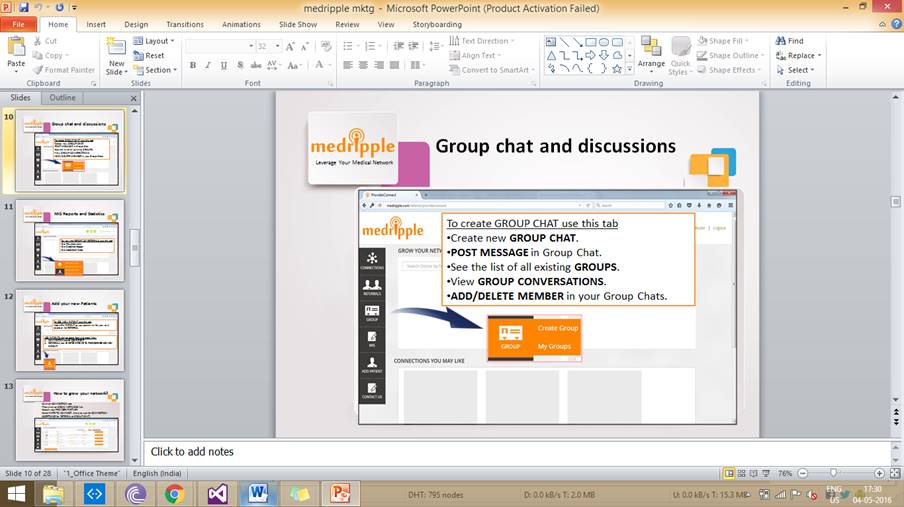
Group: - In this, doctor can make a group which helps in discussing the problem of a patient with another doctor.
Referral:- It offers to management of referrals anytime anywhere cloud based platform, where the business can be managed, patient records can be added and the referral process can be managed.
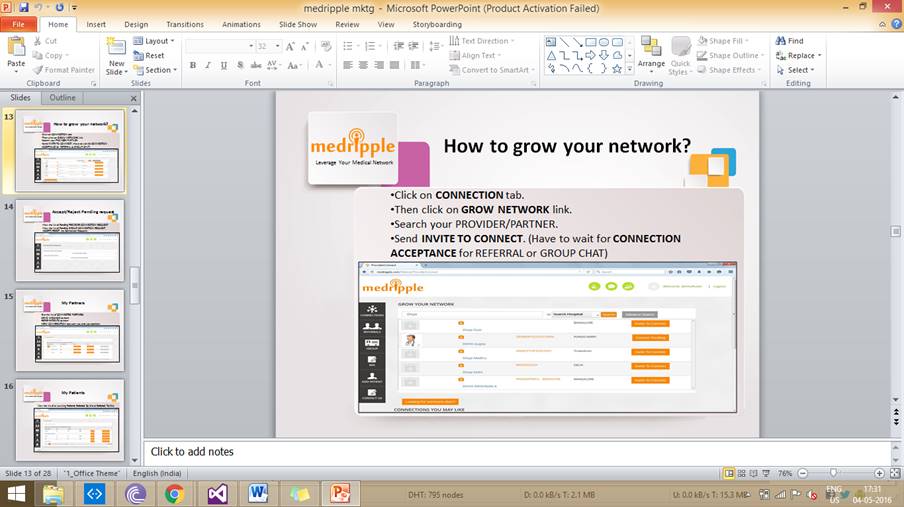
Grow Network:- It offers access to the largest provider directory in India. Once the registration is done with the updated profile, it makes it easily discoverable for your partners along with providing them with a more modern, streamlined way to stay in touch with you and your staff.
Chapter 2
System requirement specification
2.1 INTRODUCTION
Medripple offers access to the largest provider directory in India. Once you register with your updated profile, we make it easily discoverable for your partners along with providing them with a more modern, streamlined way to stay in touch with you and your staff.
2.1.1 PURPOSE
This specification document describes the capabilities that will be provided by the software application Medripple. It also states the various required constraints by which the system will abide. The intended audiences for this document are the development team, testing team and end users of the product.
2.1.2 SCOPE
The system is an online web application called Medipple that can be accessed by Doctors and Hospital staff with a proper system to log into the system. This system can be used as an application to manage the patient referral system. This system can also be used by the doctors to connect with other working doctor.
The proposed system is to make an online web application for the Medripple, so that the Doctors can register to grow their network and make a referral system easy . An administrator handles and manipulates all the data available in the system. The proposed system could be accessed from any corner of the world on net.
2.1.3 DEFINITIONS, ACRONYMS AND ABBREVIATIONS
Following abbreviations have been used throughout the documentation :-
FindApp : Find Applicants
Info : Information
Desc : Description
2.1.4 REFERENCES
(i) IEEE Recommended Practice for Software Requirements Specifications
2.1.5 OVERVIEW
The rest of the SRS document describes the various system requirements, interfaces, features and functionalities in detail.
2.2 OVERALL DESCRIPTION
The medripple system is an online website where doctors carry all the detail about their patient. Functionality of the online website for a medripple includes managing the Doctor and Patient information, managing the information provided by the Patients, providing functionality for the Doctors to enter their Patient Reports.
2.2.1 PRODUCT PRESPECTIVE
The application will be a web-based, self-contained and independent software product.
2.2.1.1 SYSTEM INTERFACES
None
2.2.1.2 USER INTERFACES
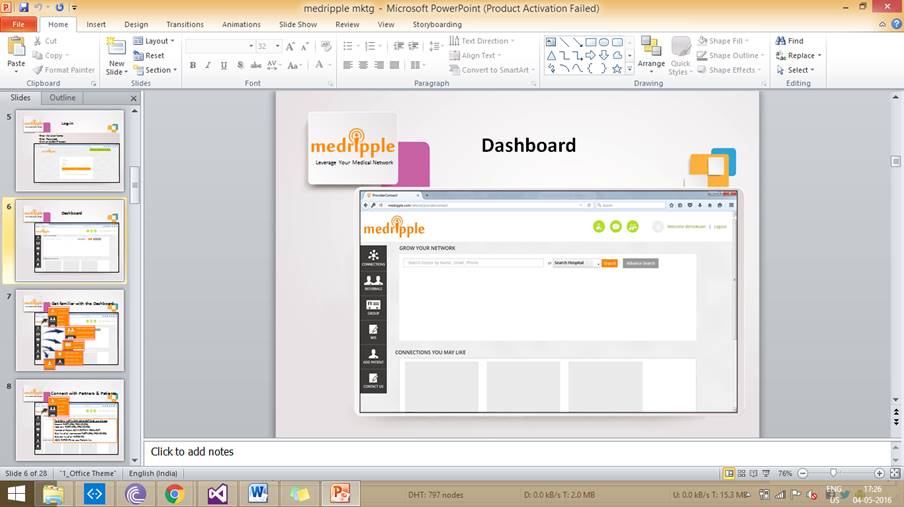
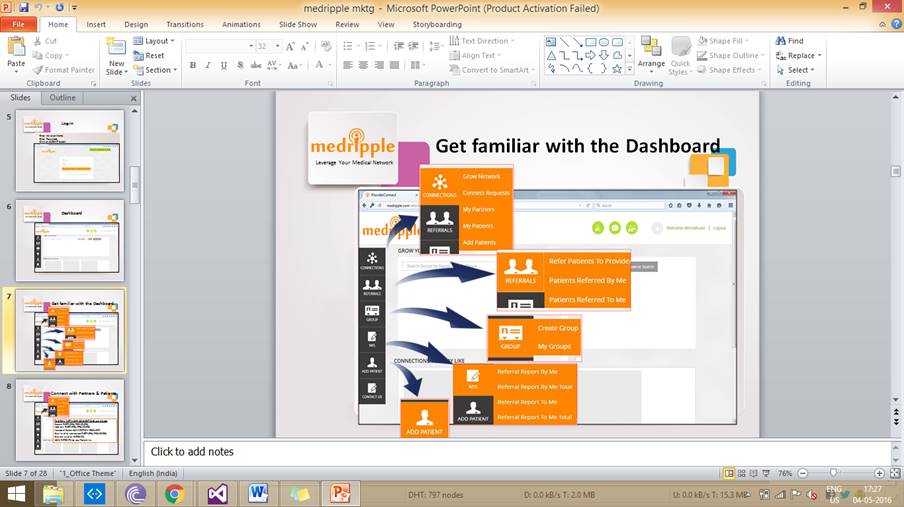
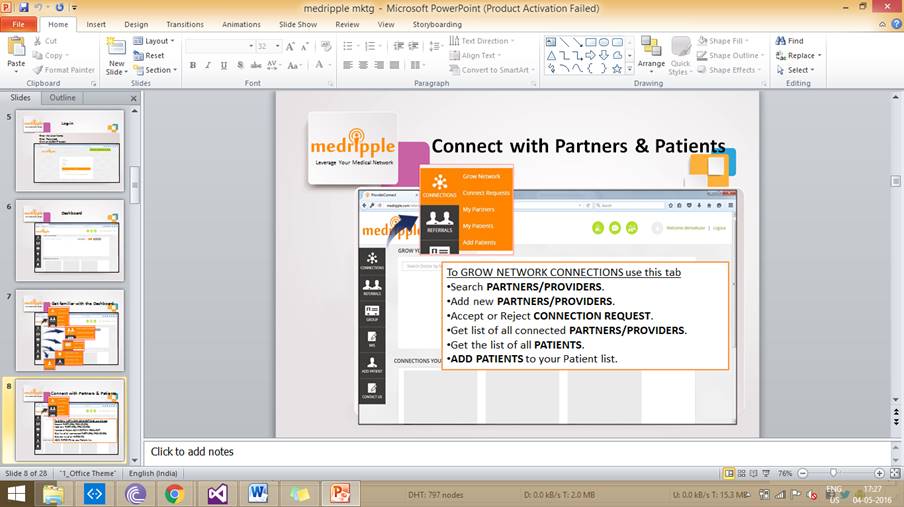
The Medripple application has a user-friendly and menu-based interface. The users of this application i.e. the doctors can add to any other doctor in the network. The User Interface will have the following pages :-
Home Page
The Register Page
The Login Page
The Grow Network Page
My partner Page
My patient Page
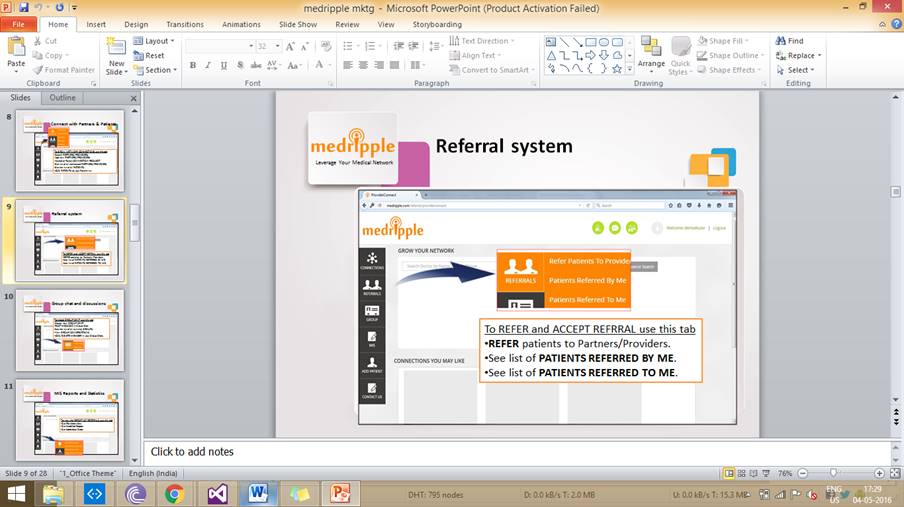
Patient referral Page
Patient Referred by Me page
Patient Referred to Me page
The Inbox Page
Patient Detail page
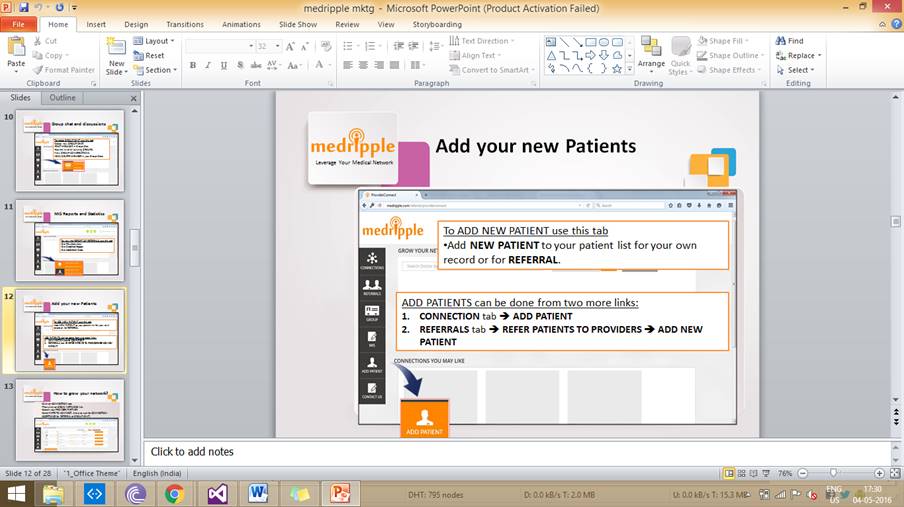
Add patient page
Create groups Page
My group page
The Profile Page
2.2.1.3 HARDWARE INTERFACES
i. Standalone System or network based- Is not a concern, as it will be possible to run the application on any of these.
2.2.1.4 SOFTWARE INTERFACES
i. Any window-based operating system.
ii. MySQL Server as the DBMS for database.
2.2.1.5 COMMUNICATION INTERFACES
None
2.2.1.6 MEMORY CONSTRAINTS
None
2.2.1.7 OPERATIONS
This product release will not cover any automated housekeeping aspects of the database. The DBA at the client site will be responsible for manually deleting old/non-required data. Database backup and recovery will also have to be handled by the DBA.
2.2.1.8 SITE ADAPTATIONS REQUIREMENTS
The terminals at client site will have to support the hardware and software interfaces specified in the above sections.
2.2.2 PRODUCT FUNCTIONS
The system will allow access only to the doctor and hospital staff. A summary of the major functions that the system will perform :-
i. Grow the network of referral doctors.
ii. Plug leakages/malpractices- make the existing referral network efficient and effective.
iii. Receive the patient referral seamlessly on web/mobile.
iv. Receive patient reports along with referrals.
v. Book, reschedule and cancel appointments with automatic updates to referring doctor.
vi. Send/get instant updates on patients progress through app notifications, messages and emails.
vii. Create groups, add members and discuss on topics related to your hospital.
viii. Let your network of referral doctors become aware of new procedure, machinery and product launches.
ix. Track region wise performance through detailed MIS reports.
x. Carry your patient details with you anywhere anytime - All the data shall be available 24x7 on web or App
2.2.3 USER CHARACTERISTICS
Educational Level : At least graduate, should be comfortable with English language.
Technical Expertise : Should be comfortable using general-purpose applications on a computer.
2.2.4 CONSTRAINTS
Users at company will have to implement a security policy to safeguard the product related information from being modified by unauthorized users (by means of gaining access to the backend database).
2.2.5 ASSUMPTIONS AND DEPENDENCIES
The Administrator is responsible for approval of doctor account.
2.2.6 APPORTIONING OF REQUIREMENTS
Not required.
2.3 SPECIFIC REQUIREMENTS
This section contains the software requirements to a level of detail sufficient to enable the designers to design the system and the testers to test the system.
2.3.1 EXTERNAL INTERFACE REQUIREMENTS
2.3.1.1 USER INTERFACES
Following screens/pages will be accessible to all the Doctors :-
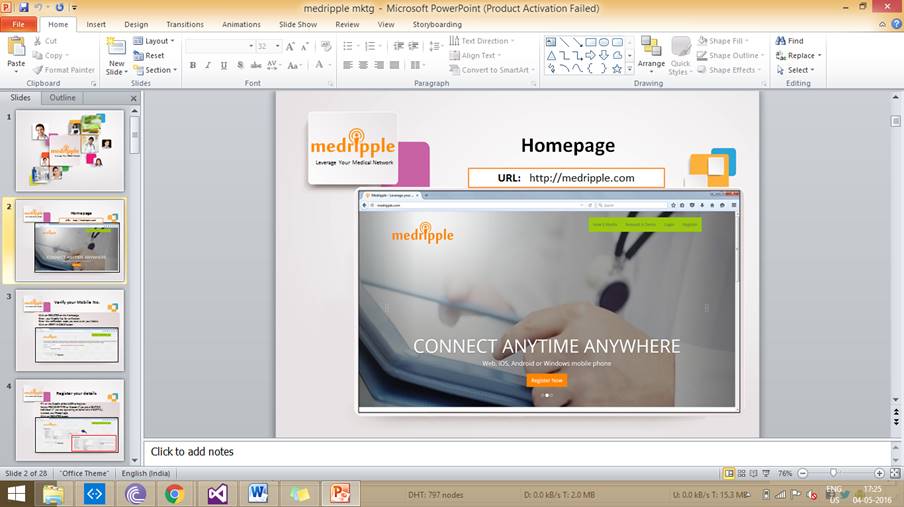
Home Page
The
Home Page of the Medripple will be the first page to
be displayed when the doctor first visits the website. This page will display a
welcome message and in addition it will display various menus to facilitate
navigation through the application.
The Register Page
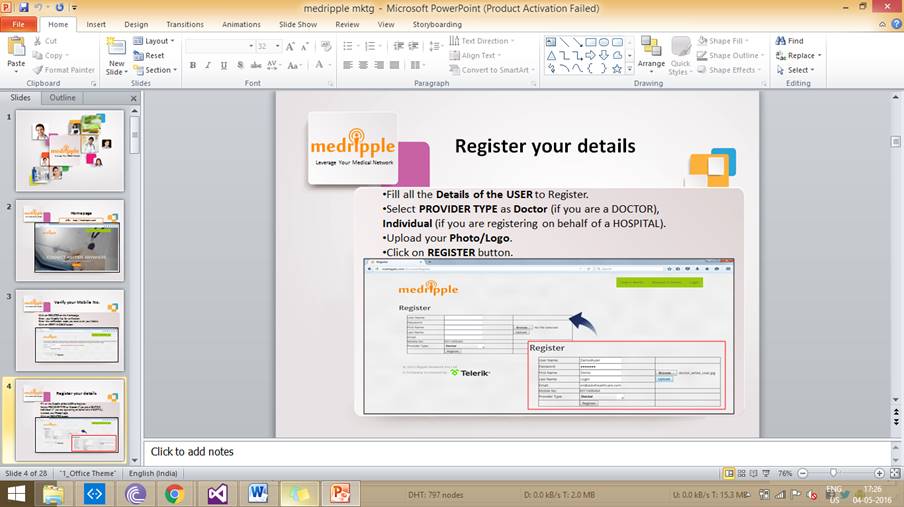
The
Register page will be used by the Doctors to register with the application.
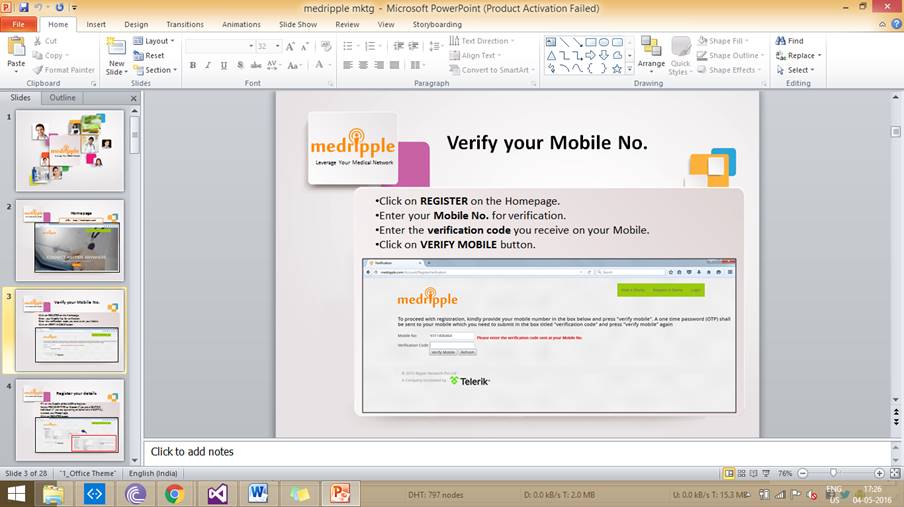
Before the registration doctors first need to confirm their mobile number.
One Time Password (OTP)
To
proceed with registration, users have to verify his mobile number by the
onetime password (OTP) which is sent to the users mobile via SMS.
Registration form
It
contains various fields as listed below:
User Name : Range 0 to 50 and
required field.
Password : Text
should be in * and required field.
First Name : First name
of the user.
Last Name : Last name of
the user.
Email
: Email-id of the user and email validation is used, also required field.
Mobile Number : It must be automatically filled by the mobile number which the
user enters at the time of OTCity: - City of the
user.
The Login Page
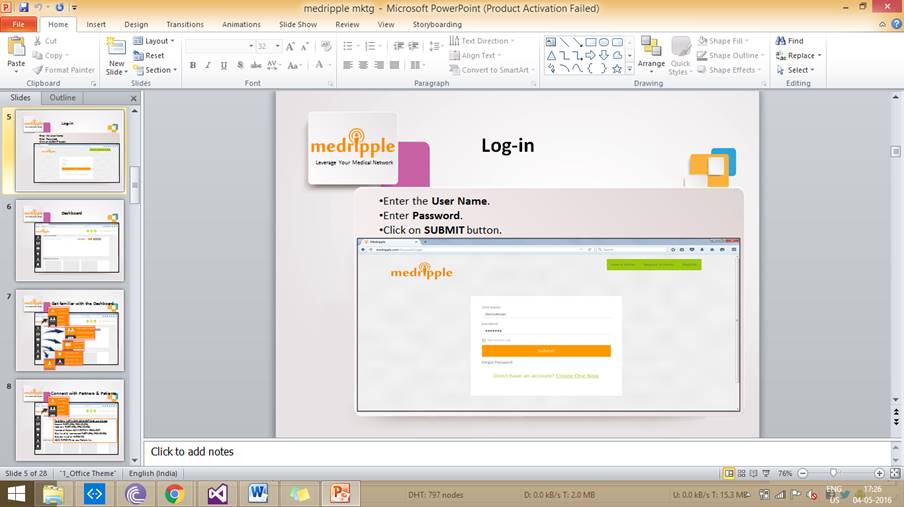
The
already registered Doctors can log into the system with the help of this page.
In this Doctors needs to fill the following fields :-
Login
: Alphanumeric of no maximum length of format abc@xyz.com
Password :
Alphanumeric of no maximum length
The Doctors with correct Login ID and Password will be logged into the system after validating them using Login table in the database.
The Grow Network Page
The
Grow Network Page of the medripple will be the first
page to be displayed when the doctor first logs into the website. This
page will display a welcome message and in addition to it, it will display
various menus to facilitate navigation through the application.
Connection request Page
It
contains two type of request which is sent by provider/doctors.
a) Provider
connection request
:Just like a friend request to a user, it has an
option of accepting or rejecting the request.
b) Group connection request : It is a group request to a user. It has an option of accepting or rejecting the
request.
My partner Page
Just
like my friends on Facebook, the entire providers/doctors who are in our
connection are present here. This page also contains functionality
like :-
1. Patient referral
2. Send message to the provider
3. See the conversation between the providers
My Patient Page
In my
patient page provides the list of patient that doctor have. In this
doctor can refer the any patient directly to the connected provider.
Doctor can also upload report of the patient.
Patient Detail page
This
page provides the complete details of the patient including name , age ,
gender, diseases, phone number, Email Id ,Address and the various report
uploaded before. He can also upload report using the upload report button. The
Doctor can edit his/her information using the edit button shown on the screen
in case he/she needs to make any changes or modifications. The Doctor can also
refer to any other provider using the button refer shown on the screen.
Add patient page
The
Add patient Page will be displayed on the menu once the Doctor has
logged into the system. Add patient Page contains a form to add a new
Patient into the application. Once the Doctor has filled the form he/she
can click the Submit button. The various fields of the form are :-
i. Name
ii. Email Id
iii. Mobile Number
iv. Relation
v. Age
vi. Gender
vii. Address
viii. Country
ix. City
Patient referral Page
The
Patient referral page provides the list of patient which the doctor has. With a
click on the select button given in front of the patient name, we can select
the patient which we have to refer. To refer the patient, doctor has to specify
the provider name to which he has to refer, any note regarding he disease.
Doctor can also upload report using the upload report button.
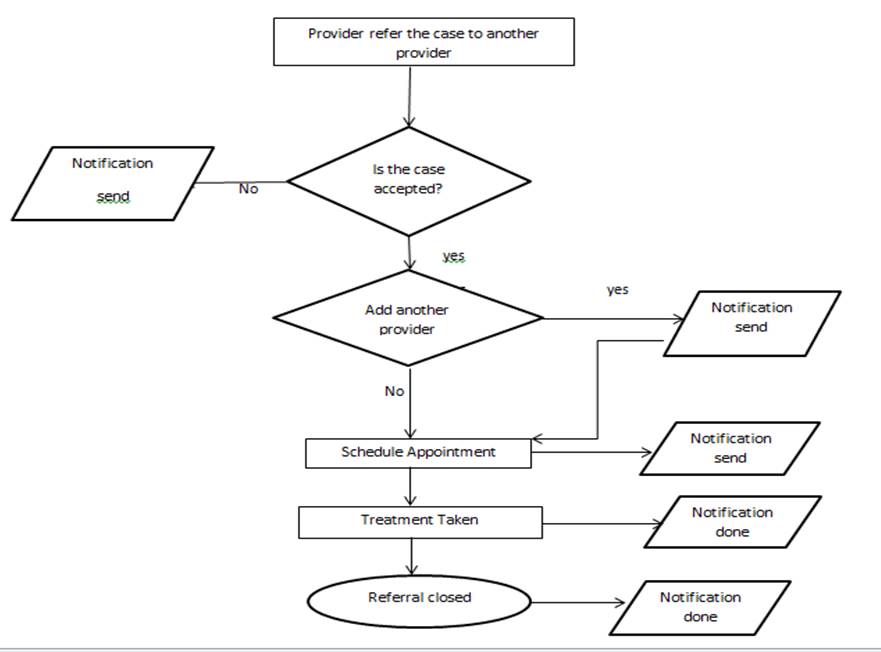
Patient Referred by me page
The
Patient Referred by me page contains the list of patient referred by the
doctor till now. It contains the information about the doctor to which we have
referred the patient, the type of provider, the date on which the last
action has been taken ,the status of the referral i.e
pending, accepted, treatment taken, appointment fixed or completed are all listed.
Patient Refer to me
The
Patient Referred to me page contain the list of patient referred to doctor
till now. It contains the information about the doctor we have referred the
patient to, the type of provider, the date on which the last action has been
taken ,the status of the referral i.e pending,
accepted, treatment taken, appointment fixed or completed.
Create groups Page
The
Create group Page will be displayed on the menu once the Doctor has logged
into the system. Create Group Page contains a form to create a
group into the application. Once the Doctor has filled the form he/ she
can click the create group button. The various fields of the form are :-
1. Group name
2. Group access type
3. Group Type
4. Group member
5. Group description
My group page
The
my group page contains the list of groups the person is added to. By clicking
on any group name we can see the group details which contain number of member,
role and member type. To delete patient details, we have to click the delete
button which is present in front of each member. Member can leave the groups
any time. A group can have only one group admin.
The Profile Page
The
Profile Page will be displayed in my account once the doctor has
logged into the system and has authorized access. It will contain all the doctorsinformation : Personal Information, Login
Information, Contact Information and Professional Information provided by the
doctor. The candidate can edit his/her information using the edit button shown
on the screen in case he/she needs to make any changes or modifications.
The Inbox Page
The
Inbox Page will be displayed on the menu once the doctor has logged into the
system and has authorized access. It will contain all the job messages that
exchange between the doctor.
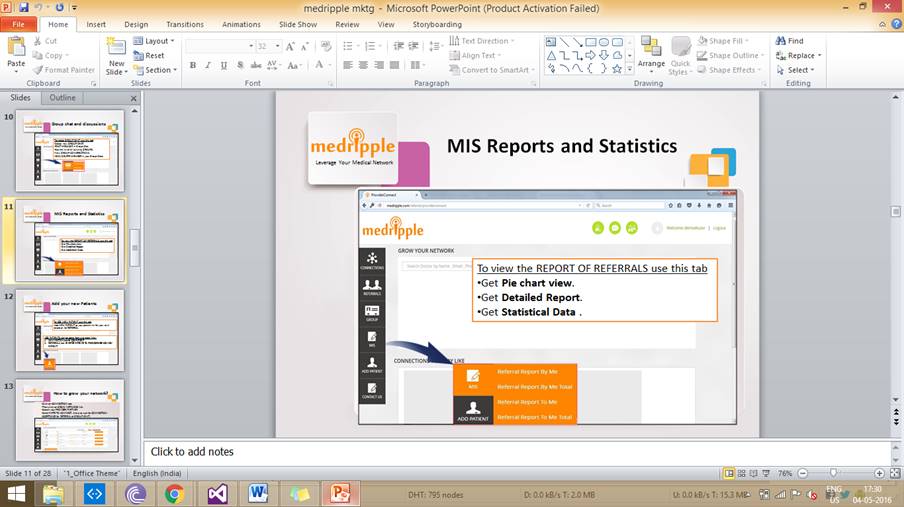
Report Referral to me
Management
Information System : Its a reporting system that we provide to the hospital.
Which help them in finding the status of the patient I.e. how he works on that
like how many referral he accepted, rejected and so on.
a. Referral details by me.
b. Referral details to me.
c. All connected patient
d. All connected doctors (provider).
7. Contact us
3.1.2 Hardware Interfaces
As stated in section 2.1.3.
3.1.3 Software Interfaces
As stated in section 2.1.4.
3.1.4 Communication Interfaces
As stated in section 2.1.5.
3.2 System Features
3.2.1 Referral system
Description: MANAGE YOUR REFERRALS ANYTIME ANYWHERE. CLOUD BASED PLATFORM WHERE YOU CAN MANAGE YOUR BUSINESS, ADD PATIENT RECORDS AND MANAGE THE REFERRAL PROCESS. To do this we have to register all new patients on the platform. Refer your patients using the platform. Track your patients progress on the platform.
Validity Checks:
The Validations will be applied on the Parameter set of the referral. Referral will only be send to the connected provider. It must contain the name of the disease. We have to give notes while giving referral. We have to specify to which provided we have to send the referral.
Sequencing Information:
Parameters will be first entered on the User Interface of the Referral.
Error Handling/Response to Abnormal Situation: If any of the above validations/sequencing flow does not hold true, appropriate error message will be prompted to the user for doing the needful.
3.2.2 Grow network
Description : GROW YOUR NETWORKFIND THE PEOPLE AND CONNECT WITH THEM
Showcase your profile. Search & connect with your potential partners. Invite your existing partners on to the platform
Validity Checks:
The Business Validations will be applied on the Parameter set of this grow network.
The Provider should be a valid member of Medripple.
Sequencing Information:
Parameters will be first entered on the User Interface of the grow network.
Error Handling/Response to Abnormal Situation: If any of the above validations/sequencing flow does not hold true, appropriate error message will be prompted to the user for doing the needful.
3.2.3. Report
The doctor can easily upload reports, with the help of which the doctor can easily consult with other doctor by sending him the report. It also benefits the patient as he is not required to carry report with him while going to the other doctor.
Validity Checks:
The Business Validations will be applied on the Parameter set of this grow network. The provider must specify the type of report. Report type is only contain pdf or jpeg form.
Sequencing Information: Parameters will be first entered on the User Interface of the Report.
Error Handling/Response to Abnormal Situation: If any of the above validations/sequencing flow does not hold true, appropriate error message will be prompted to the user for doing the needful.
3.2.4. Group: -
In this, doctor can make a group which helps in discussing the problem of a patient with another doctor. There are two types of groups one is the normal type where every group member can send the message and one is the announcement type where only the group admin can send the message.
Validity Checks
The Business Validations will be applied on the Parameter set of this Group. The User has to give the name of the groups. The user has to specify the access type i.e. public or private.
The user has to specify the group type i.e. normal or announcement. The user has to choose the member to whom he wants to add in the group.
Sequencing Information
Parameters will be first entered on the User Interface of the Group.
Error Handling/Response to Abnormal Situation: If any of the above validations/sequencing flow does not hold true, appropriate error message will be prompted to the user for doing the needful.
3.5 Software System Attributes
3.5.1 Security
The application will be password protected with a unique username for each user.
3.5.2 Maintainability
The application will be designed in a maintainable manner. It will be easy to incorporate new requirements in the individual modules and extend the existing project.
3.5.3 Portability
The application will be easily portable on any web server which is J2EE Compliant.
3.6 Logical Database Requirements
The following information will be placed in the database:-
User Login Table : Username, Password, CompanySysId, CompanyName
ReportProperty Table : ReportPropertySysId, ReportPropertyTypeCVid, Code, Description, EnhancedViewEnabled, InteractiveViewEnabled, IsAsyncFlag
3.7 Other Requirements
None.
Chapter 4
DESIGN OF THE SYSTEM
Screen shots
Home page